AMD Ryzen 5 9600X Desktop Processor: The Ultimate Zen 5 Efficiency & Gaming Guide
Discover how the AMD Ryzen 5 9600X and modern Zen-powered compact PCs deliver high-FPS 1440p gaming and efficient thermals without the high power consumption of flagship processors.
Building a modern gaming rig or compact workstation in 2025 comes down to one crucial factor: balancing raw compute performance with thermal efficiency. The arrival of the Zen 5 architecture brought the AMD Ryzen 5 9600X to the forefront of DIY desktop builds. Featuring 6 cores, 12 threads, and a restrained 65W default TDP, this processor has captivated builders looking for high-frame-rate 1440p gaming without the astronomical power draw or cooling requirements of flagship chips.
Yet, as desktop spaces shrink and multi-use environments evolve, enthusiasts face a tough decision: do you invest hundreds of dollars into custom tower components, or does an ultra-efficient AMD setup fit your lifestyle better? Let’s explore what makes modern Ryzen silicon such a compelling choice for everyday gaming, creative work, and space-saving computing.
The Zen 5 Architectural Leap: Efficiency Meets Speed
AMD's Zen 5 architecture marks a refined shift in desktop computing. Rather than chasing purely aggressive clock frequencies that require massive 360mm liquid cooling setups, processors like the Ryzen 5 9600X leverage improved instructions per clock (IPC), broader execution pipelines, and enhanced branch prediction to maximize speed per watt.
For DIY builders, this translates to tangible benefits:
- Tighter Thermal Control: Operating at a baseline 65W TDP means standard air coolers easily keep temperatures under control, reducing fan noise in living rooms and home offices.
- Future-Proof AM5 Platform: Native DDR5 memory support and PCIe 5.0 lanes ensure that modern GPUs and storage drives operate with zero platform bottlenecks.
- Responsive Single-Threaded Punch: Competitive esports titles such as Counter-Strike 2, Valorant, and Apex Legends thrive on single-core speed, delivering fluid 1440p frame rates without hitching.
While desktop builders love sourcing individual motherboards, cooling brackets, and power supplies, not every user has the desk footprint or budget to assemble a full ATX tower from scratch.
Desktop Tower vs. Ultra-Compact AMD Systems
For many PC hobbyists, the desire for high-performance Ryzen processing clashes with workspace limitations. If you live in an apartment, share an office space, or prefer a clutter-free desk, a giant tower chassis can feel intrusive.
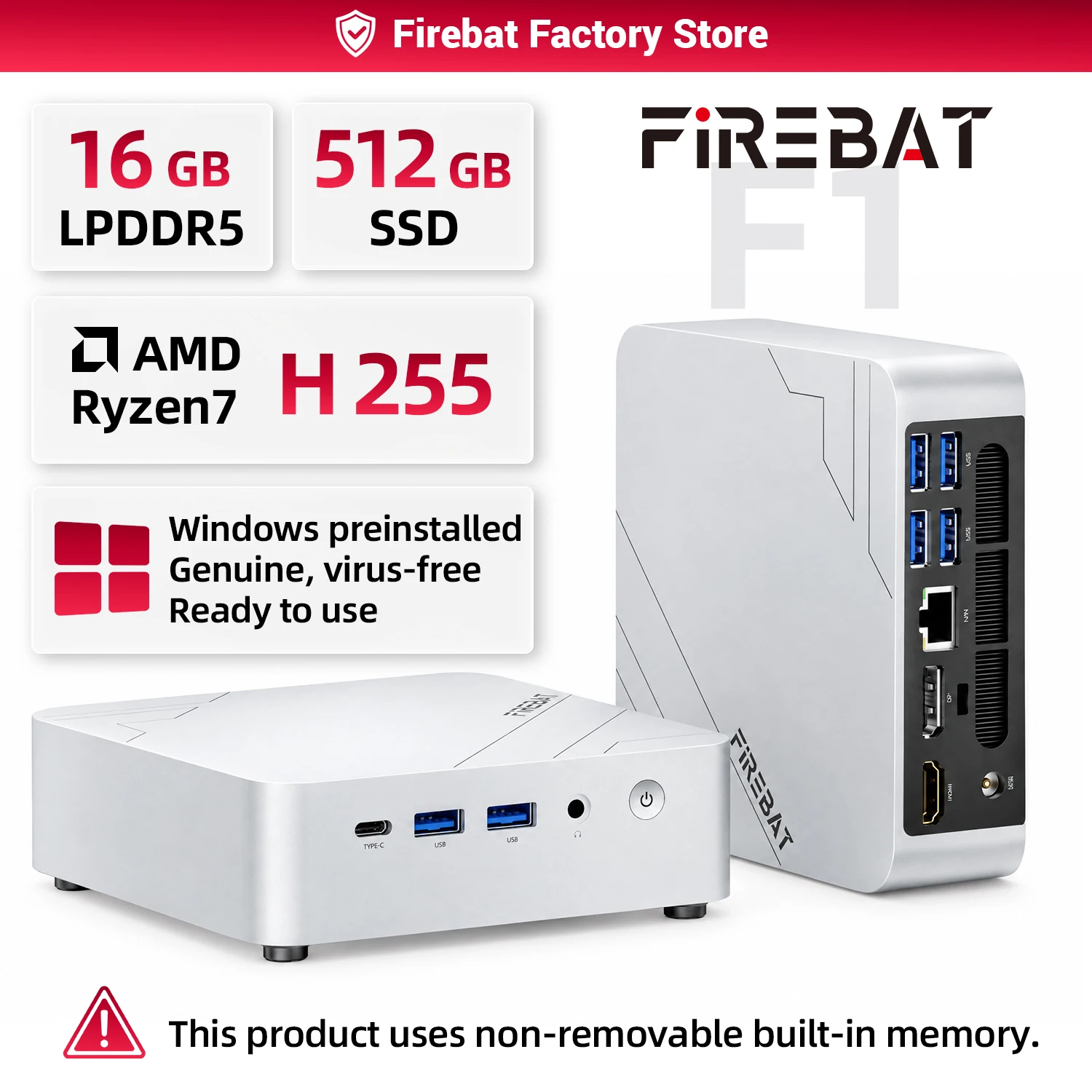
This is where turnkey systems like the FIREBAT F1 Mini PC present an intriguing alternative. Built around potent AMD Ryzen multi-threaded silicon, compact units capture the core spirit of Zen efficiency in a form factor you can easily tuck behind a monitor or slip into a backpack.

Instead of navigating the complexities of matching motherboard VRMs, cable management, and high-wattage power supplies, choosing an efficient Ryzen desktop computer gives you 16GB of fast LPDDR5 memory, an NVMe SSD, and pre-installed Windows 11 right out of the box.
Thermal Management and Power Consumption in Everyday Use
One of the main selling points of AMD's modern line-up is operating efficiency. The Ryzen 5 9600X runs cool enough that builders can assemble small form factor (SFF) ITX enclosures without worrying about thermal throttling under sustained multi-threaded workloads.
Modern power draws also mean lower energy bills and cooler ambient room temperatures during summer gaming marathons. When reviewing real-world usage patterns:
- Light Work and Web Browsing: The CPU sips single-digit wattages, keeping system fans virtually silent.
- Productivity and Rendering: Zen 5 multi-threading handles video exports and photo editing with steady thermal dissipation.
- High-Refresh Gaming: By shifting workload efficiently between cache and cores, games maintain high 1% lows without generating overwhelming heat.
Similarly, micro-desktop computers leverage engineered blower-style coolers and integrated vapor chambers to keep Ryzen chips humming at comfortable temperatures throughout intense daily sessions.

Versatile Connectivity and Multi-Monitor Productivity
A powerful processor needs versatile input/output capabilities to shine. Modern AM5 motherboards feature high-speed USB 3.2 Gen 2x2 ports, DisplayPort 1.4, and multiple HDMI outputs to facilitate high-resolution, high-refresh multi-display configurations.
Whether you're compiling code across dual monitors, managing financial charts, or streaming gameplay to a secondary capture card, peripheral throughput is essential. Turnkey AMD mini systems deliver this same multi-monitor support alongside WiFi 6 and Bluetooth 5.2, proving that you do not need a 30-pound metal enclosure on your desk to drive a complete three-screen workstation.
How to Choose Your Next AMD Setup
Before opening your wallet, consider your primary use case:
- Choose an AM5 DIY Tower with the Ryzen 5 9600X if: You plan to install a heavy discrete GPU like an RTX 4070 or RX 7800 XT, upgrade individual parts over the next five years, and push ultra-high frame rates at 1440p or 4K.
- Choose a Compact Ryzen System like the FIREBAT F1 if: You want reliable multi-threaded compute, 4K video playback, seamless office productivity, and casual gaming without sacrificing precious desk space or spending countless hours on manual PC assembly.
Final Verdict
The AMD Ryzen 5 9600X cements AMD's dominance in the mid-range efficiency segment, providing an incredible foundation for enthusiast gaming and creative tasks. For DIY tinkerers, it hits the sweet spot between thermals, gaming FPS, and power consumption.
At the same time, if you want that celebrated Ryzen responsiveness packed into a whisper-quiet, palm-sized chassis ready for work and play, exploring a pre-configured compact AMD workstation offers unbeatable convenience and desk-friendly power. Assess your space, define your performance targets, and enjoy the remarkable efficiency modern AMD engineering brings to your desk.